
When you need to customize an LED display for a project, you may be confused by these two parameters: frame rate and refresh rate. They both affect the smoothness of the content. This article will give you a complete introduction to the frame rate and refresh rate, and provide you with some corresponding customization advice.
What is Frame Rate?
The frame rate refers to the number of frames displayed per second. It decides the smoothness of the video or game visuals. Frame rate is usually measured in FPS (Frames Per Second). In simple terms, 30 FPS means 30 frames appear per second, and they produce a smooth video.
That is to say, when the frame rate is higher, you will feel the motion is smoother, and the visual experience is more comfortable. Common frame rates include 30 FPS, 60 FPS, 120 FPS, and even much higher.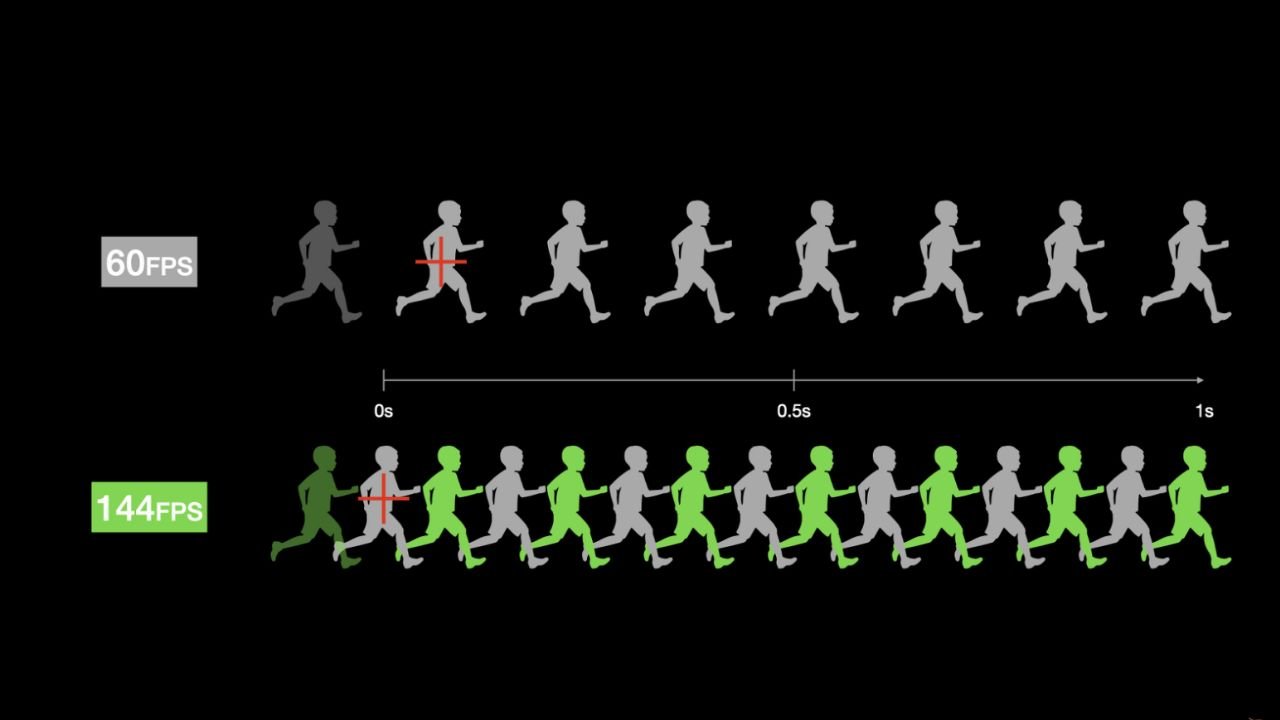
What is Refresh Rate?
The refresh rate means the number of times a display refreshes the image each second. It uses hertz (Hz) as the unit. Common refresh rates are 60Hz, 120Hz, 144Hz, 240Hz, and higher. For LCD screens, low refresh rates may cause blur and obvious ghosting in fast-moving images. Higher refresh rates make animations, games, and video motion smoother, and your visual experience more comfortable.
What is LED Display Refresh Rate?
Unlike LCD screens, LED screens do not have fixed pixels. They refresh images by scanning the LED bulbs. The refresh rate of LED displays is also measured in Hz. Typical LED display refresh rates are 1920Hz, 3840Hz, or 7680Hz. A higher refresh rate means the screen redraws the images faster. This greatly reduces ghosting, flicker, and shaking.
Difference Between Frame Rate and Refresh Rate
Function
For LED displays, the frame rate affects the smoothness of the video or animation playback that you experience. High frame rate makes the content smoother. While the refresh rate can affect whether the screen flickers when taking pictures or in bright environments. A high refresh rate can eliminate black bars and flickering.
Visual Impact
If the frame rate of the video or screen is very low, you will see that the movements are not smooth and the picture will become choppy. If the refresh rate is very low, you will see obvious flickering and ghosting. This reduces the quality of content playback, and may cause your visual fatigue.
Key Application Scenarios
Scenes that need to show rapid movements and continuous animations require placing greater emphasis on frame rate, such as video advertisements, stage animations, and dynamic presentations, etc. Meanwhile, for scenarios that need high stability in screen shooting, such as live TV broadcasts and stage performances, the refresh rate becomes even more important to pay attention to.
Hardware Dependence
The frame rate mainly depends on the video source and playback device, while the refresh rate is mainly decided by the LED module chips and driver performance. For LED displays, a high refresh rate requires high-performance LED chips and driver ICs, and a reliable scanning method. Only this can ensure the accuracy of the number of refreshes per second.
How to Choose the Frame Rate For an LED Display?

When choosing the frame rate of the screen, you need to consider multiple factors comprehensively: content type, view distance, and your budget.
Content Type
The type of content is one of the most important decision factors. If you expect to play static content, then 30 fps is sufficient. If you expect to play content with high dynamic range, such as sports or stage performances, 60fps or 120fps would be a better choice. In conclusion, the frame rate of the display screen should be higher than the original frame rate of the video, so that there is no frame skipping or ghosting.
Viewing Distance
When the viewing distance you expect is short, a low frame rate may cause the movements to become noticeably sluggish. This requires appropriately increasing the frame rate. When the viewing distance is far, the action lag will not be easily detectable by your eyes. At this point, you can choose a lower frame rate.
Confirm Your Budget
There is no doubt that the higher the frame rate, the smoother the show will be. However, as the frame rate increases, the cost also rises. High frame rates require higher requirements for the graphics card, modules, and transmission bandwidth. Therefore, you need to choose an appropriate frame rate to balance the smoothness and cost.
How to Choose the Refresh Rate For an LED Display?
The refresh rate of the LED display should be confirmed based on its application scenario, the requirements of camera shooting, and the ambient brightness, etc.
Use Scenario
When LED screens are used in different situations, the need for refresh rate varies. For the indoor meeting room, 960Hz or 1920Hz is sufficient; for the shopping malls or exhibitions, a higher frequency, such as 3840Hz, can be considered; for outdoor high-brightness advertising screens or stadium screens, a refresh rate of 3840Hz or higher is required.
Camera Shooting Requirements
In some cases, the camera needs to capture the content on the screen. The screens with low refresh rates may display black bars, stripes, or flickering when being photographed. The refresh rate you choose should be 16 times or more of the camera’s frame rate. For example, when you use a 60fps camera to shoot the stage screen, the LED refresh rate should be more than 1920Hz.
Environmental Brightness
The environmental brightness is also an important factor to consider. When you need to view the screen in a low-light indoor environment, the refresh rate of the LED screen should be at least 960Hz or higher. When you need to place it outdoors, where the ambient brightness is high, a higher refresh rate is needed. A range of 1920Hz to 3840Hz or even higher is recommended.
Other Factors That Affect the Video Smoothness
The Content Itself
The main factor influencing the playback smoothness is the content itself. Without the frame interpolation algorithm, the screen cannot create extra frames. For example, if the video itself is 25FPS, and the screen is 120FPS, then the screen can only display the smoothness of 25FPS. Besides, if the video bitrate is low, or there are frame losses, the performance will also be affected.
LED Screen Hardware and Modules
The driving chip determines the scanning speed, grayscale levels, PWM modulation frequency, and other details of the LED screen. High-end driver ICs can make the picture transitions smoother and provide a stable high refresh rate for the screen.
Control System
The control system of an LED screen decides the maximum supported frame rate, refresh rate, and data processing bandwidth. The low-end control system has limited capacity for data processing and may cause delays. The high-end control systems can precisely synchronize the content. Some of them even support intelligent algorithms, like dynamic compensation and jitter optimization, enhancing your visual experience.
Latest Technology Trends in Frame Rate and Refresh Rate
Motion Compensation
Motion compensation is a technique that aims to improve the smoothness of the video. Its work principle is analyzing the motion trajectories between adjacent frames, calculating the intermediate motion states, and generating the inserted frames. It is usually used in projects with high requirements for frame rate, such as in stadiums.
AI-Based Frame Optimization
With the development of deep learning, AI is also used in the display industry. AI video frame interpolation, AI super resolution, AI noise reduction, and AI deblurring are starting to be applied. It can upscale old movies and enhance the video quality. Nowadays, in LED screens, AI algorithms are widely used.
Advanced Scanning Mode
The scanning way of the LED display decides the sequence in which the LED light beads inside the screen are lit up. This is the principle of the screen that displays each frame of the video. The dynamic scanning optimizes the scanning sequence of the branches, giving priority to refreshing the highlighted areas. It can enhance the visual effect without increasing power consumption.
Adaptive Refresh Technology
Adaptive refresh technology refers to the LED display that can dynamically adjust the refresh rate based on the content. When the content is static, it switches to a low refresh rate; when the content is dynamic, it switches to a high refresh rate. It can reduce the power consumption of the display screen and also ensure the smoothness of the picture.
FAQs
Does a Higher Refresh Rate Improve Motion Clarity on LED Screens?
Yes. Actually, higher refresh rates can significantly improve motion clarity on LED screens, especially for fast-moving content. The higher the refresh rate, the more times the screen will be scanned per second. Besides, the flickering and lingering images captured by the camera will also be fewer.
Is It Necessary for the Refresh Rate to Match the Frame Rate for Smooth Video?
Yes. The screen’s refresh rate needs to be higher than the frame rate of the video content. This will make the video more stable and prevent flickering. If the refresh rate is lower than the frame rate, there may be screen frame loss, unsmooth visuals, and trailing effects. This will affect the true performance of the high frame rate content.
What Refresh Rate is Recommended for Indoor and Outdoor LED Displays?
When you select the refresh rate for LED screens, you should consider factors like viewing distance, ambient light, and filming or live broadcast requirements. For indoor displays, 1920Hz and 3840Hz are recommended. Flickering may occur in direct sunlight. Therefore, outdoor displays need to have a very high brightness. So, for high-brightness outdoor screens, 3840Hz and 7680Hz are recommended.
Does a Higher Frame Rate Always Result in Better Image Quality on LED Displays?
This is not always true. Higher frame rate mainly improves the motion smoothness, rather than the static image quality. When the frame rate is increased from 30fps to 60fps, the number of frames displayed per second will increase. The picture details will not be more, and the number of pixels will not increase either.
Can a Low Refresh Rate Cause Flickering on LED Displays?
Yes. Low refresh rate is one of the main causes of flickering on LED screens. Especially when the refresh rate of the LED display is lower than about 1200Hz, and the environment is dark, you may easily feel visual fatigue. Besides, if the refresh rate is low, horizontal black bars will appear during live streaming or recording. This will affect the shooting quality.
JINYLED: Your Reliable LED Display Manufacturer in China
JINGYLED is an LED display manufacturer in China with more than ten years of experience. We have the ability to produce displays with different frame rates, refresh rates, sizes, and resolutions, which can meet your actual requirements.
JINGYLED will provide customized solutions for your needs. We also have rich export experience and can serve customers all over the world. No matter if you are in Asia, America, Europe, or Africa, we can promise smooth import and export.
If you have any further questions, feel free to contact us!

